Moderated live Q&A chat
In an open chat, the loudest messages take all the room. Moderation reverses that: only useful questions reach the guest, in the right order and in a clear form.
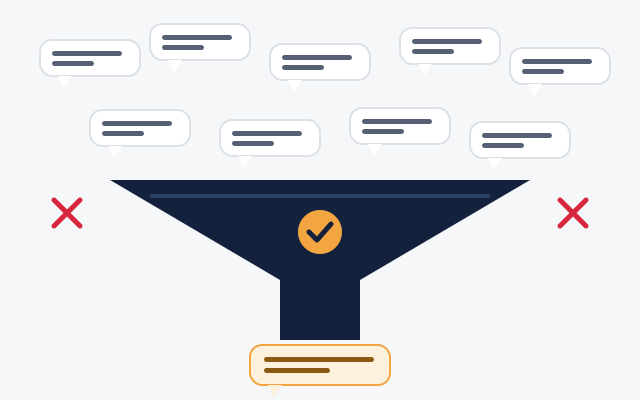
What the moderator does
- Sorts: every question lands in a queue only the moderator sees.
- Groups: ten versions of the same question become one.
- Rephrases: fixes spelling, shortens, makes the question clear to everyone.
- Sets the pace: opens and closes questions on the audience side and sends private notes to the guest.
- Protects: temporarily kicks or bans a participant who breaks the rules.
Built-in safeguards
Even before a human steps in, the chat limits abuse: a viewer cannot send more than one question every N seconds, and the moderator can close the question box at any time. The event can be restricted to users already logged in on your site.
Moderating without censoring
The moderator is not there to drop awkward questions, but those that are off topic, abusive or repeated. Publishing your rules at the start of the session, and keeping critical questions when they are properly worded, strengthens the guest’s credibility.
A good rule: if ten people ask the same difficult question, it has to be asked.
How many moderators?
For a few dozen participants, one moderator is enough. Beyond that, plan a second moderator and, if you publish a transcript, someone dedicated to typing it. See the moderator interface in detail.
Moderating a permanent chat
The same principles apply to a chat that stays open, but with other tools: appointed moderators, word filters, reporting. HTML5-Chat and Dialogoo include these administration and moderation features for community chats.
Your next event deserves a real conversation
We show you Chat Événementiel in real conditions, then adapt it to your brand and your audience.